
The information provided below is an overview of Neeley financial policy and procedures.

Please note, financial instruments (revenue/expense/transfer/journal), contractual items and payroll transactions route through the Neeley Budget Office (NBO). Below are brief instructions regarding Neeley’s processes.

Neeley Finance, Budget, & Facilities Staff:

Updates

February 10, 2026 – Neeley Finance & Budget Process Summary website released.
Departments must use the TCU E-Procurement System (Jaggaer) for all goods and services purchases not made with a university-issued credit card. Services may not be paid for using a university-issued card.

Please see the TCU Procurement webpage to learn more about purchasing policies and TCU.

  • Purchasing in Jaggaer
    • Jaggaer Login
    • Procurement Policies
      • Procurement Process Workflow
    • Invoices
    • Catalogs
    • Non-Catalog Purchasing
    • Change Requests
    • Handling Returned Requisitions
  • Supplier Information
  • Request for Credit Application
  • Purchase Order Requisition
  • Department Purchasing Request (TCU Bookstore, Printing, & Copying)

Neeley Guidelines

  • Goods and services must be shipped/delivered to university campus addresses only. Shipping to personal addresses is restricted.
  • Use the Purchase Order system for purchases made with Sodexo (TCU food services) and Nesbitt (TCU cleaning services).
  • Food drop-off/pick-up for business purposes may charge up to $2,500 on the Travel Credit Card.
  • Food delivery to campus (not drop-off) with catering services provided requires a contract and certificate of insurance. Supplier’s own contract requiring a signature/deposit will need to be uploaded into the TCU contract file.
  • Personal accounts with TCU Punchout Catalog suppliers are forbidden (i.e., no using personal Amazon accounts for TCU purchases).
  • All technology items are purchased by Neeley IT. Please submit a Neeley technology support ticket at NeeleySupport.tcu.edu and provide budget codes for your department.

Flow Chart

TCU requires a written contract, signed by an authorized delegate [TCU Signature Delegation of Authority (SDA) Policy], for all service transactions. On-site installation and/or maintenance of equipment and other tangible property will convert a purchase of goods into a service transaction. Written contracts memorialize each party's expectations, rights and obligations. More importantly, written contracts help protect TCU's interests, including those of our students, faculty, staff and alumni.

Please review the TCU Contract Administration webpage to learn more about purchasing policies and TCU.

  • Service Contracts
  • Non-Monetary Education Affiliation, Revenue, & Intellectual Property Contracts
  • Contracting at TCU
    1. Contract Request Entry in Jaggaer
    2. Contract Creation & Review
    3. Contract Approval

Neeley Guidelines

  • All services and anything requiring a signature (except Sodexo catering orders) must have a contract prior to ordering.
  • An employee may not sign anything on behalf of TCU [Signature Delegation of Authority (SDA) Policy].
  • The contract request (if required) and Purchase Order must be submitted in Jaggaer at least two weeks prior to date of service in order to provide a fully executed contract. Some contracts may take longer to process (i.e., databases, hotels, clubs, etc.).
  • If a contract requires multiple payments, upload each invoice. Once the contract is fully paid the PO will show fully matched and closed.
  • Examples of items that will need contracts are (not exhaustive list):
    • Group & Student hotel stays
    • Room rentals – off campus events
    • Alcohol
    • Services
    • Deposit required
    • Advance full payment
    • Memorandums of Understanding (MOU’s)
    • Non-Disclosure Agreements (NDA)
    • Click-through Agreements
    • Sponsorships
    • Anything that requires a certificate of insurance

Please review the University Credit Card Programs website for helpful information regarding the use of University Credit Cards.

Texas Christian University provides employees with two types of University Credit Cards for purchasing business-related goods: the Purchasing Credit Card (PCard) and the Travel Credit Card.

Purchasing Credit Card (PCard)

The TCU Purchasing Credit Card is issued to eligible faculty and staff to help streamline the payment processes for low-dollar, infrequent business expenses. This card type is designed for the purchase of physical or tangible goods. The purchase of services is not permitted on any University Credit Card.

  • Purchasing Card (P-Card)
    • Tangible Goods
    • Departmental Purchases
    • Books (not from TCU Bookstore)
    • Promotional items (Swag)
    • Event Supplies
    • Instructional & Office Supplies
    • Arts and Craft Supplies
    • Nametags
    • Gift Cards (Kroger or other retail)
    • Professional Association Dues
    • Professional Training

Travel Credit Card

The Travel Credit Card is issued to eligible faculty and staff to facilitate the purchase of University related business travel and entertainment expenses. The purchase of services is not permitted on any University Credit Card.

  • Travel Credit Card
    • Food Pick Up/Drop Off Orders
    • Food Expenses
    • Travel Arrangements
    • Hotel Reservations (Individual)
    • Car Rentals & Ground Transportation
    • Parking Fees
    • Guest/Candidate Travel Arrangements (direct bill for approved suppliers)
    • Conference Registration Fees

Neeley Guidelines

  • The use of a personal debit/credit card for the purchase of a good or services for university business is restricted.
  • Food drop-off/pick-up for business purposes may charge up to $2,500 on the Travel Credit Card.
  • General spending limits on university cards are $2,500 per transaction and per month. Employee-specific limits may be higher or lower based on department restrictions and your role. P-Card single transaction limits are always $2500.
  • PCards are limited to eight transactions per day unless otherwise authorized.
  • Purchases should not be split into multiple transactions to stay within the limits.
  • If a purchase is above the threshold, submit a request to SAP Concur for a Limit Increase, and include the details of the purchase in the request. Include “increase to/by” and if the request is for a single transaction limit, overall limit, or both.
  • Purchases equal to or under $2,500 should be purchased on a University Credit Card(s) unless it involves the purchase of services or by Contract. If a University Credit Card(s) is not available, the cardholder must submit the purchase in the E-Procurement System for the issuance of a purchase order prior to purchase. [TCU Procurement Policy]

Please review the Travel & Expense website for helpful information regarding traveling and managing expenses.

  • Getting started with Concur
  • Managing Expenses in Concur
  • Student, Guest and P-card expenses
  • Travel instructions
    • International travel

Neeley Guidelines

  • If you have questions regarding your fund or department codes, send an email to Monnie Cozby (m.cozby@tcu.edu).
  • Department members may serve as delegates for departmental reimbursements.
  • Anthony Travel should be utilized for flight arrangements and hotel when possible. Anthony Travel prefers booking TRANSFERABLE flights, or flights that can provide a flight credit if not taken, not necessarily refundable ones. Refundable is an option, should the traveler request it, but it’s not the default, as those tend to see a jump in price.
    • If you do use Anthony Travel, tell them to use the “air card” and DO NOT charge the TCU Global account. See Jaggaer & Expenses > Concur Tip Sheet, and Procurement Policy Training slides 5,6.
  • Hotel billing should be “direct bill.”
  • Prior to travel you must submit a travel request in Concur

Please review the Supplier Information website for helpful information regarding managing supplier relationships.

  • Supplier Registration
  • Insurance Requirements
  • Invoice Information
  • Payment Terms
  • Purchase Order Terms and Conditions
  • Tax Exemptions Status
  • W-8 Form: Certificate of Status
  • W-9 Form: Request for TIN
  • Current Solicitations and Bid Opportunities

The Neeley Budget Office reconciles Neeley School financials. Budget process updates coming soon!

Sodexo is TCU’s primary campus caterer. Offerings from Sodexo are located at https://dining.tcu.edu/catering/.

If using outside caterers on campus who provide full service (i.e., they set up and/or serve food), a contract is required.

If the supplier has a master service agreement, no contract is needed. Instead, simply follow the purchase order process.

Food drop-off/pick-up for business purposes may charge up to $2,500 on the Travel Credit Card.

To obtain a TCU dining facilities card go to Departmental Meal Plans and submit a form. Neeley does not reimburse for TCU dining facility meals. Using the Meal card incurs a lower cost and will not include sales tax.

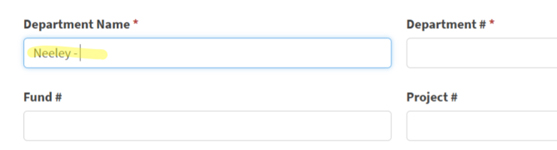
When filling out dining card form, be sure to include the name “Neeley -” in front of the department name as shown below:

Department Name field should begin with Neeley

Neeley Guidelines:

  • Meals for spouses are not reimbursable without prior approval from Neeley Budget office.

Alcohol service for off campus events requires a contract, vendor’s Certificate of Insurance (COI), TABC license, and TCU alcohol form.

To serve alcoholic beverages in academic or administrative buildings or on TCU property, you must have a signed TCU alcohol form granting approval. Email the completed form to Amy Hurd [a.hurd@tcu.edu], at least 15 business days prior to an event.

Sodexo is the exclusive seller and server of alcohol on TCU’s campus.

Request to Serve Alcoholic Beverages in Academic or Administrative Building or on TCU Property

Guidelines from Faculty/Staff Handbook:

Serving Alcohol on Campus - The consumption, sale or use of alcoholic beverages is generally prohibited on campus. However, under certain conditions, alcoholic beverages may be served at campus events. Use of alcohol at events on campus must be approved by the Vice Chancellor for Student Affairs. All alcohol must be purchased and served under the auspices and policies of the food service contractor at TCU. Approval will be granted if:

  • participation at the event is primarily for those who meet the legal drinking age standard.
  • arrangements are made to serve appropriate alternative beverages.
  • arrangements are made to serve appropriate food at the event.
  • a process to prevent serving underage drinkers is in place.

No TCU student organization may sponsor any on campus event that involves the use of alcohol.

Serving Alcohol off Campus - The University prohibits the use or possession of alcoholic beverages in instructional settings, including those remote to the campus. There may arise occasions when a faculty/staff member may wish to have alcohol served at certain functions off campus. Examples include events commemorating the completion of an academic or general University program. It is expected that participants will be of legal drinking age in the country where the event occurs. Prior approval must be received from the Vice Chancellor under whose auspices the program occurs. Except in those cases approved by the Vice Chancellor, social activities with alcohol that involve both students and faculty that are sponsored or paid by the University or a University employee are prohibited. [Faculty/Staff Handbook]

TCU is an academic tax exempt 501-C-3 and does not pay Texas state sales tax, except on alcohol purchases. You may need to provide suppliers with TCU’s Texas Sales and Use Tax Exemption Certification, which updates annually. When traveling, or making hotel reservations in TX, provide the hotel with the TCU Texas Hotel Occupancy Tax Exemption Certificate.

We do not pay sales tax and receive a 25% discount on non-textbook items at the TCU Bookstore. For TCU Bookstore purchases fill out the Purchase Order Requisition Form and send via email to Monnie Cozby [m.cozby@tcu.edu].

  • Provide the business purpose for each item purchased
  • Include estimated spend amount for each item
  • Include authorized budget codes
  • Monnie Cozby will review, sign, and return the form to you
  • Take this approved form to the bookstore to make purchase
  • Send receipt from purchase to Monnie Cozby

For printing needs,

  • Complete the TCU Print Services order form found on the Departmental Services webpage.
  • Email this form to Monnie Cozby [m.cozby@tcu.edu]. Monnie will review and approve this form, then will email the form back to you.
  • Forward this approved form and your file to be printed to Print Services [itprintingservices@tcu.edu]. You may drop off your order or upload to their website.
  • See the Departmental Services webpage for more information.
  • Departmental Printing Services will send you a yellow copy of the print order form. Please send this yellow form to Monnie Cozby [m.cozby@tcu.edu].

For event signage (i.e., yard signs, posters, etc.)

  • Contact Jonathan Van Pelt [J.VANPELT@tcu.edu] to walk you through the ordering process.
  • To produce/approve new artwork for signage, contact Erin Smutz [e.smutz@tcu.edu] or complete this form.
  • Also, Autumn Bryant [autumn.bryant@tcu.edu] must pre-approve anything displayed in Neeley buildings. This includes departmental signage such as banners, posters, decorations, as well as any signage changes.

Requests to transfer funds from Neeley to another TCU unit (i.e., cross unit transfers), or vice versa, must be emailed to Karen Ferguson [k.ferguson@tcu.edu]. This includes billing from TCU Police, Conference Services, BLUU, Kelly Center, Human Resources, Athletics, Tennis Center, TCU Rec Center, or any other School/Unit on campus who want to charge Neeley for goods/services. DO NOT use a TCU credit card to pay for TCU services. TCU cannot pay TCU, therefore, Karen will make the money transfers for us.

TCU uses FrogTime (TimeClockPlus) for time keeping. Please review the TCU Timekeeping website to learn more about using FrogTime and contact Karen Ferguson [k.ferguson@tcu.edu] if you need further assistance using FrogTime at Neeley.

Both the employee and their supervisor must approve time prior to 10am every Monday morning. Employees and supervisors receive reminder emails to approve hours every Friday and Monday from Karen Ferguson and TCU payroll.

Hiring managers should review the Frog Jobs website, powered by Handshake for instructions on setting up jobs. All jobs must be posted in the Handshake system.

For hiring Graduate Assistants (GA), contact Anne Rooney [a.rooney@tcu.edu] who provides a list of qualified candidates every semester.

Neeley pays Undergraduate students $10/hr and MBA students $20/hr.

Once your job gets posted in Handshake, check your account to view resumes. Once a student has accepted a position send them this link to apply for available jobs and send the following information to Karen Ferguson [k.ferguson@tcu.edu]:

  • Job #
  • Student’s full name
  • Student ID#
  • Name of student’s supervisor
  • Department and Fund numbers to be charged

International students without a Social Security number (SSN) must apply with Social Security to obtain the SSN. Student must first obtain a letter from Karen Ferguson [k.ferguson@tcu.edu] that will be needed for this SSN application. This process could take about six weeks to complete.

Once Karen obtains all the information listed above, she will set up the job and provide a start date.

Payment for event sponsorships requires a contract. TCU may not make donations as a 501-C-3 Academic non-profit but may sponsor events. Sponsoring an event requires detailed information regarding the benefits TCU receives as a sponsor. Vendor terms and conditions, and attendee names are required. If a meal with alcohol is served, the TCU alcohol form, vendor’s COI, and TABC must all be obtained.

If you have questions regarding how to accept gift funds, set up online event gift revenue, or how to invoice donors, please email Laura Barclay [l.barclay@tcu.edu], Dir. Neeley Advancement.

If you receive gifts by physical check, bring the check, envelope, and donor correspondence to Karen Ferguson, in Hays (NEEL 4318), or place an interoffice envelope in the Dean’s office mailbox, in Neeley mail/copy center, Sumner (NEEL 3226).

Neeley does not handle cash or non-gift checks.

TCU Neeley uses the TouchNet system to receive non-gift revenue/fees, (i.e., events, products, trips, on-credit or executive education courses, or TESS). If your department wishes to collect money for an event or product, please submit a ticket to TCU Neeley IT support:

  • Ticket type: Website revisions > Add New > Web Form > Accepts Payment > provide your event details> Save.
  • If you have questions email Karen Ferguson [k.ferguson@tcu.edu].

If your department needs to give a customer or donor TCU’s form W9, it can be downloaded from Accounting & Financial Services Forms website. If you have a customer/donor who wants to pay TCU via wire or ACH, email their name, email address and any form needed to Karen Ferguson [k.ferguson@tcu.edu].

Please review the Reimbursement for University-Related Business Expenses policy for helpful information regarding fully or partially reimbursed by the university regardless of the source of funds.

Guest Reimbursements

Please review the Jaggaer Guest Reimbursement Instructions for submitting guest reimbursement requests. Guest reimbursements are processed through the Guest Reimbursement form, located in the Accounts Payable Forms section within Jaggaer. Users with authorization to submit Payment Requests in Jaggaer will have the ability to submit Guest Reimbursement forms. Please ensure that you carefully review the instructions provided on the form when completing the Guest Reimbursement request.

We need to be careful when we give prizes to students as it may interfere with rules around financial aid that they are already receiving. If your department plans to award student scholarships or prizes, please contact Karen Ferguson [k.ferguson@tcu.edu] to help determine special rules that may apply.

Scholarships must be vetted through Financial Aid, email Nancy Cathey, nancy.cathey@tcu.edu.

Neeley has its own Mail/Copy Center in Sumner Hall-3226 that is managed by Karen Bisnette [k.bisnette@tcu.edu] [ phone: x6542 ] .

  • Open Monday through Friday 8:00 a.m. – 2:00 p.m.
  • Use your TCU ID to enter after 2 pm or when door is closed

To use Xerox printers at TCU (Neeley Copy Center, Harrison, Library, etc.), employees must enroll in PaperCut, which charges print and copy jobs to the appropriate departmental budget codes. Please take your TCU ID card to the Neeley Mail/Copy Center and Karen Bisnette will set up your PaperCut account. When using the FollowMe Queue Printing feature across campus, simply use your TCU ID at any Xerox copier to activate.

Employees may email print jobs directly to Karen Bisnette.

Your department has a mailbox that receives TCU mail and print jobs.

  • Students are not allowed in the mail/copy center as it contains confidential materials.
  • Karen handles Neeley mailing/shipping.
  • Neeley employees may not use Neeley accounts to ship personal items.
  • Personal packages with complete labeling may flow through the Neeley center, but Neeley does not handle personal mail. Personal mail can also be sent through the TCU Mail Services Center located on the Northwest side of the TCU Commons, next to Chick-Fil-A.

For bulk mailing, turn in the Mailing Services Job Request form from the Post Office & Mailing Services website to Monnie Cozby [m.cozyb@tcu.edu] for approval. Attach the approved form to your item to be mailed and deliver to the Neeley Copy/Mall Center.